
# Skyboxes
All API endpoints require an API Key sent in a header or as a get parameter. Please refer to the Making requests section to find out more.
To queue multiple skyboxes in one request, see Skybox Batches.
# Generate Skybox
This section explains how to generate skyboxes.
To generate a skybox, start by selecting a skybox style. You'll need to use the id of the chosen style
as the skybox_style_id parameter in your request. Styles can use different models.
Model 2 is deprecated, Model 3 is our standard widespread model and Model 4 comes with the latest improvements.
For more details on how to retrieve available styles,
refer to the Get Skybox Styles section.
Model 2 and 3 skyboxes are generated in 8K resolution by default, while model 4 skyboxes are always generated in 4K resolution.
Skyboxes can be exported later on in other formats and resolutions (model 4 skyboxes can be exported in 1K, 2K, and 4K resolutions; 4K is the default).
Check the Skybox Exports section for more details.
# Model 4
Model 3 and Model 4 styles use the same endpoint with some differences in which params are available for each model. Model 4 generations produce higher quality results and can deduct up to 6 credits depending on the variant you choose.
For example, Standard variant will deduct 3 credits and Enhanced one will deduct 6 credits. Check the variant_id param description below on how to use different Model 4 variants.
Plan access: Model 4 styles and quality variants (variant_id Standard or Enhanced) require a Standard or Business plan. Essential and Free plans cannot use Model 4 (the API returns 403 Access denied).
# Method
POST
# API Endpoint
https:/api/v1/skybox
# Params
| Key | Data Type | Description | |
|---|---|---|---|
| skybox_style_id | Int | Predefined styles are used to choose the model version and influence the overall aesthetic of your skybox generation (Fantasy landscape, Anime art style, etc...). Explained in more detail here. | required |
| prompt | String | Text prompt describing the skybox world you wish to create. Maximum number of characters: 2000. If you are using skybox_style_id then the maximum number of characters is defined in the max-char response parameter defined for each style | required |
| negative_text | String | Describe things to avoid in the skybox world you wish to create. Maximum number of characters: 600. If you are using skybox_style_id then the maximum number of characters is defined in the negative-text-max-char response parameter defined for each style | optional |
| enhance_prompt | Boolean | Have an AI automatically improve your prompt to generate pro-level results every time (default: false) | optional |
| horizon_shift | Int | Defaults to 0. Accepted values vary from -20 to 20. Negative shifts horizon down, positive shifts up. Use cases: ground-heavy scenes (positive value), sky-dominant scenes (negative value), fixing equator seams (±5-10). | optional |
| variant_id | Int | ID of a generation quality variant, from the variants array returned by the Get Skybox Styles endpoint. If omitted, the default variant for the style is used automatically. Use the variant ID to influence the overall quality (and speed) of your skybox generation. For example, if you used variant_id of 2 (Enhanced variant) the quality of the skybox generation would be higher but it would also take more time to produce it. | optional |
| soft_lines | Boolean | Only applicable to Model 4 styles. Enables softer line rendering while preserving structural geometry (retains structure). Default: false. | optional |
| seed | Int | Send 0 for a random seed generation. Any other number (1-4294967295) set will be used to "freeze" the image generator and create similar images when run again with the same seed and settings. | optional |
| webhook_url | String | Optionally, you may specify a webhook url to specify the destination for progress updates | optional |
| max_wait | Int | Maximum number of seconds to wait for the generation to complete. If the generation does not complete within this time, it will be set to error status and credits will be refunded. Accepted range: 30-1800 seconds. Recommended to set higher than the estimated latency for your chosen variant (see the Model 4 estimated latency details below). | optional |
TIP
Usage of the horizon_shift param:
- Ground-heavy scenes (landscapes, terrain) — positive value raises horizon, gives more sky
- Sky-dominant scenes (Sky Dome, flight sim) — negative value lowers horizon, expands sky
- Fixing equator seams — small adjustments (±5) can help blend ground/sky transitions
Based on the variant you select for model 4 you can expect different results when it comes to generation times, cost and quality. Check the table below for more details.
| Variant | Variant ID | Credits | Est. Latency | Recommended Timeout |
|---|---|---|---|---|
| Standard | 1 | 3 | ~60s | 120s |
| Enhanced | 2 | 6 | ~120s | 240s |
Concurrency limit
- 1 simultaneous generation per account
- Queuing multiple requests in rapid succession does not improve throughput - each must complete before the next is processed
- Effective throughput at Standard tier: ~1 generation per minute
# Model 3
Model 3 and Model 4 styles use the same endpoint with some differences in which params are available for each model.
Model 3 generations are Fast and will always deduct 1 credit.
# Method
POST
# API Endpoint
https:/api/v1/skybox
# Params
| Key | Data Type | Description | |
|---|---|---|---|
| skybox_style_id | Int | Predefined styles are used to choose the model version and influence the overall aesthetic of your skybox generation (Fantasy landscape, Anime art style, etc...). Explained in more detail here. | required |
| prompt | String | Text prompt describing the skybox world you wish to create. Maximum number of characters: 2000. If you are using skybox_style_id then the maximum number of characters is defined in the max-char response parameter defined for each style | required |
| negative_text | String | Describe things to avoid in the skybox world you wish to create. Maximum number of characters: 600. If you are using skybox_style_id then the maximum number of characters is defined in the negative-text-max-char response parameter defined for each style | optional |
| enhance_prompt | Boolean | Have an AI automatically improve your prompt to generate pro-level results every time (default: false) | optional |
| seed | Int | Send 0 for a random seed generation. Any other number (1-2147483647) set will be used to "freeze" the image generator and create similar images when run again with the same seed and settings. | optional |
| remix_imagine_id | Int | ID of a previously generated skybox. Check the example here. | optional |
| remix_collection_id | Int | ID of a previously created project. Projects are created and edited on our frontend app. There you can copy the ID of the project/collection and use it as a value for this field. When using this option a random skybox will be selected from the project as a starting point of the remix. Check the example here. | optional |
| control_image | Binary or Base64 string or Absolute URL | Control image used to influence the generation (ie. remix from control image). Explained in more detail here. | optional |
| control_image_hash | String | To be used instead of the control_image param in order to avoid uploading the same file each time. The value of the param should be an obfuscated_id (hash ID) of an already generated skybox which used a control image. The control image of that existing skybox will be used for subsequent generations. | optional |
| control_model | String | Model used for the control_image. Currently the only option is: "remix". | optional |
| init_image | Binary or Base64 string or Absolute URL | Init image used to influence the generation (ie. remix from init image). Explained in more detail here. | optional |
| init_image_hash | String | To be used instead of the init_image param in order to avoid uploading the same file each time. The value of the param should be an obfuscated_id (hash ID) of an already generated skybox which used an init image. The init image of that existing skybox will be used for subsequent generations. | optional |
| init_strength | Float | Scale to be used as initial influence of the "Init Image" for Skybox generation. It uses an inverted scale. Allowed range is between 0.11 and 0.9, where 0.11 represents lots of influence, and 0.9 represents no influence. Only has an effect when using an init_image parameter. | optional |
| webhook_url | String | Optionally, you may specify a webhook url to specify the destination for progress updates | optional |
| max_wait | Int | Maximum number of seconds to wait for the generation to complete. If the generation does not complete within this time, it will be set to error status and credits will be refunded. Accepted range: 30-1800 seconds. Recommended to set higher than the estimated latency (see the Model 3 estimated latency details below). | optional |
Additional details for model 3 regarding cost, estimated generation time and recommended timeouts.
| Credits | Est. Latency | Recommended Timeout |
|---|---|---|
| 1 | ~20s | 60s |
# Generate skybox request example
To generate a skybox send application/json POST request to https://backend.blockadelabs.com/api/v1/skybox with prompt parameter as a description of the skybox world you wish to create. You can also try our Postman collection to start testing:
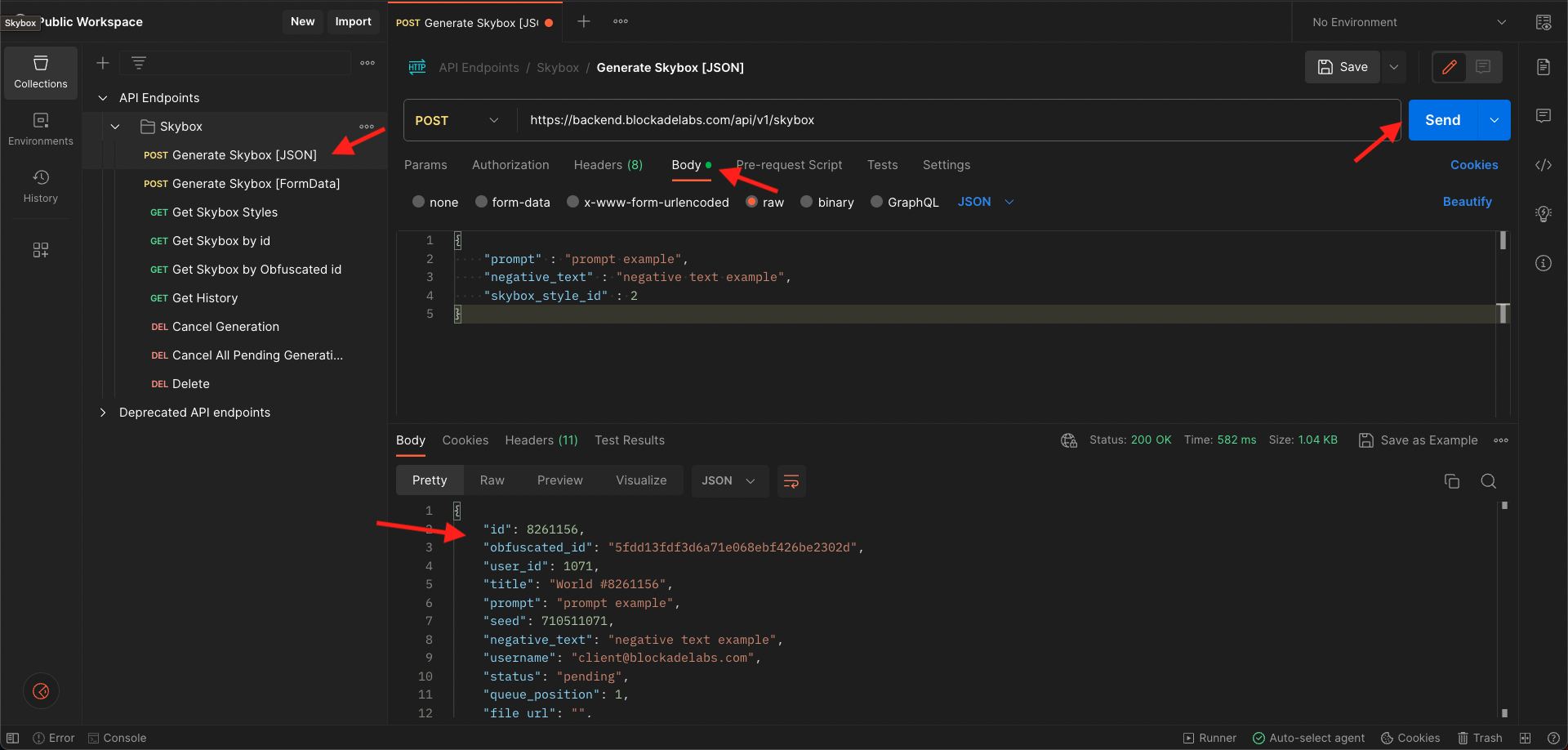
# Response example
{
  "id": 123456, // id of your generation. It can be used to track generation progress or to cancel the generation
  "skybox_style_id": 155, // skybox style id used in a generation request
  "skybox_style_name": "Open World", //skybox style name used in a generation request
  "variant_id": 1, // variant id used for generation (only present for Model 4 generations)
  "model": "Model 4", // model used to generate
  "status": "pending", // initially status is set as 'pending' after you send a generation request. Status will change from one state to another and you will get updates for each one if you are using pusher or webhook: pending -> dispatched -> processing -> complete. Also you can get abort or error.
  "type": "skybox", // type of skybox generation
  "queue_position": 2, // position of your request in a generation queue
  "file_url": "", // full size of generated image url (empty until generation is completed)
  "thumb_url": "", // thumbnail of generated image url (empty until generation is completed)
  "title": "Imagination #123456", // generation title
  "user_id": 1, // your user id
  "username": "user@blockadelabs.com", // your username
  "error_message": null, // if status=error here you should see the error message
  "obfuscated_id": "460370b7328a5cb8dbddd6ef0d1c9dd4", // hash id of your generation
  "pusher_channel": "status_update_460370b7328a5cb8dbddd6ef0d1c9dd4", // pusher channel name used to track generation progress
  "pusher_event": "status_update", // pusher channel event used to track generation progress
  "created_at": "2023-03-18T10:42:19+00:00", // time created
  "updated_at": "2023-03-18T10:42:19+00:00" // time updated
}
TIP
Don't forget that after you receive the response above you need to track generation progress.
# Generation progress - Status update message example:
{
  "id": 123456,
  "obfuscated_id": "460370b7328a5cb8dbddd6ef0d1c9dd4",
  "skybox_style_id": 155,
  "skybox_style_name": "Open World",
  "variant_id": 1, // variant id used for generation (only present for Model 4 generations)
  "model": "Model 4",
  "status": "complete",
  "queue_position": 1,
  "file_url": "https://blockade-platform-production.s3.amazonaws.com/images/imagine/detailed_digital_painting_cd_computer_render_fantasy_vr_dreamscape__6fee994c6f9f2229__793071_6.jpg?ver=1",
  "thumb_url": "https://blockade-platform-production.s3.amazonaws.com/thumbs/imagine/thumb_detailed_digital_painting_cd_computer_render_fantasy_vr_dreamscape__6fee994c6f9f2229__793071_6.jpg?ver=1",
  "depth_map_url": "https://blockade-platform-production.s3.amazonaws.com/depths/imagine/detailed_digital_painting_cd_computer_render_fantasy_vr_dreamscape__6fee994c6f9f2229__793071_6.jpg?ver=1",
  "title": "Imagination #123456",
  "user_id": 1,
  "username": "user@blockadelabs.com",
  "error_message": null,
  "pusher_channel": "status_update_460370b7328a5cb8dbddd6ef0d1c9dd4",
  "pusher_event": "status_update",
  "created_at": "2023-03-18T10:42:19+00:00",
  "updated_at": "2023-03-18T10:42:36+00:00"
}
# Error Responses
| Code | Message | Cause | Resolution |
|---|---|---|---|
| 403 | You don't have an active subscription | Inactive or expired subscription | Contact Blockade Labs support |
| 403 | Access denied | API key doesn't have access to the model or style, or your plan does not include Model 4 (Essential and Free are blocked; Standard and Business are allowed) | Upgrade to Standard or Business for Model 4, or use a Model 3 style; otherwise contact Blockade Labs support |
| 403 | Negative text is disabled when Strict Prompt is enabled. You can disable this in your Profile settings. | Strict prompt is enabled in your profile settings | Go to your profile on the FE app and disable Strict Search option or omit negative_text param |
| 403 | You do not have permission for this action | Your subscription might not have the necessary permissions to perform a desired action | Contact Blockade Labs support |
| 404 | Skybox style does not exist | Wrong style ID | Check the available styles on the /api/v1/skybox/styles |
| 404 | Could not find any completed Skybox generations in this collection. | Returned when using the remix_collection_id param. Means that the collection you specified doesn't contain any complete skyboxes | Make sure you used a valid collection id and that a collection contains at least 1 complete skybox |
| 404 | Skybox with the specified init image hash was not found / Init image for the specified skybox was not found. | Returned when using the init_image_hash param. Means that the init image of the specified skybox doesn't exist. | Make sure that the skybox you specified was initially created with init image. |
| 404 | Skybox with the specified control image hash was not found / Control image for the specified skybox was not found. | Returned when using the control_image_hash param. Means that the control image of the specified skybox doesn't exist. | Make sure that the skybox you specified was initially created with control image. |
| 422 | No prompts submitted | Required prompt param was not sent, or possibly invalid JSON (e.g. trailing comma) | Make sure you used the prompt param and validate JSON |
| 422 | Wrong hash for init image. Check your init image hash. | Returned when using the init_image_hash param. Means that obfuscated_id (hash ID) of an already generated skybox which used an init image is not correct. | Make sure that you used the correct obfuscated_id (hash ID) of an already generated skybox which was created with init image. |
| 422 | Wrong hash for control image. Check your control image hash. | Returned when using the control_image_hash param. Means that the obfuscated_id (hash ID) of an already generated skybox which used a control image is not correct. | Make sure that you used the correct obfuscated_id (hash ID) of an already generated skybox which was created with control image. |
| 429 | You have reached your pending generation limit of {N}. Please wait for some generations to complete before submitting more. | You have too many generations in a pending state | Wait for in-progress generations to complete before submitting new ones. See the Pending Generation Limits section below. |
| 500 | Error submitting imagination | Backend service might be down | Contact Blockade Labs support |
| 503 | Prompt enhancer service is currently not operational. Please try later. | Third-party providers used for prompt enhancer might be temporarily down | Try again later or set enhance_prompt to false until service is restored. If the issue persists contact Blockade Labs support |
WARNING
GPU warmup note: First 1-2 generations in a new session may show increased artefacting as GPU runners initialise. Expected behaviour - retry before reporting as a defect.
# Pending Generation Limits
Each account has a limit on how many generations can be in a pending state at the same time. Submitting a new generation when the limit is reached will return a 429 error. Once one or more of your pending generations complete, you can submit new ones.
Limits per plan:
| Plan | Max Pending Generations |
|---|---|
| Free | 1 |
| Essential | 3 |
| Standard | 3 |
| Business | 30 |
# Generate Skybox Examples
Use the following examples as a request parameters for the generate skybox API request:
POST https://backend.blockadelabs.com/api/v1/skybox
# Generate Skybox using the "Open World" style (Model 4)
{
  "skybox_style_id": 155, // "Open World" skybox style id
  "prompt": "prompt example"
}
# Generate Skybox using the "Open World" style (Model 4) with a specific quality variant
{
  "skybox_style_id": 155, // "Open World" skybox style id
  "prompt": "mountains",
  "variant_id": 2 // use the "Enhanced" quality variant; get variant ids from the Get Skybox Styles response
}
# Generate Skybox using the "Open World" style (Model 4), with negative text, horizon_shift, variant_id, seed, prompt enhancer and webhook_url
{
  "skybox_style_id": 155, // "Open World" skybox style id
  "prompt": "mountains", // when enhance_prompt is sent this text will be used by AI to improve it
  "negative_text": "clouds, river", // avoid generating clouds and river
  "horizon_shift": 5, // shift the horizon line up from the center
  "enhance_prompt": true, // automatically improve the prompt
  "variant_id": 2, // use Enhanced quality variant
  "seed": 234143, // set generation seed number
  "webhook_url": "https://www.example.com/webhook" // the url destination where the progress updates should be sent
}
# Generate Skybox using the "Cyberpunk" style (Model 3)
{
  "skybox_style_id": 90, // "Cyberpunk" skybox style id
  "prompt": "prompt example"
}
# Generate Skybox using the "Cyberpunk" style (Model 3), with negative text, seed, prompt enhancer and webhook_url
{
  "skybox_style_id": 90, // "Cyberpunk" skybox style id
  "prompt": "mountains", // when enhance_prompt is sent this text will be used by AI to improve it
  "negative_text": "clouds, river", // avoid generating clouds and river
  "enhance_prompt": true, // automatically improve the prompt
  "seed": 234143, // set generation seed number
  "webhook_url": "https://www.example.com/webhook" // the url destination where the progress updates should be sent
}
# Remix previously generated skybox (Model 3)
{
  "skybox_style_id": 90, // "Cyberpunk" skybox style id
  "prompt": "prompt example",
  "remix_imagine_id": 123456 // id of a previously generated skybox
}
# Remix using a random skybox from a previously created project (Model 3)
{
  "skybox_style_id": 90, // "Cyberpunk" skybox style id
  "prompt": "prompt example",
  "remix_collection_id": 123456 // id of a previously created project
}
# Remix from uploaded (equirectangular) image - Control image (Model 3)
{
  "skybox_style_id": 90, // "Cyberpunk" skybox style id
  "prompt": "prompt example",
  "control_image": "https://images.blockadelabs.com/skybox-starters/42_133ff00e73def7ca30c01b24be7991d9_file.jpg", // this parameter can be sent as Binary, Base64 string or Absolute URL string
  "control_model": "remix" // required parameter in order for "remix from control image" to work
}
# Remix from Control Image - Best practices
This feature uses the shape and structure of your uploaded image, but not the colors. You get a skybox that keeps the scene’s shapes and perspective, but with new artistic styling and colors.
Use this when you want to keep the structure of your image (like mountain placement, horizon, etc.) but are okay with it being reimagined in style and color.
The control_image should be an equirectangular image sent across as binary,
base64 or absolute URL with a common resolution of 2048x1024 or greater,
with an aspect ratio of 2:1 and a max file size of 50MB.
Images submitted outside of the aspect ratio of 2:1 will be forced to a 2:1
ratio during processing which could produce undesired image warping.
When using a control image you should always include a param of control_model with a value of remix.
# Remix from uploaded (equirectangular) image - Init image (Model 3)
{
  "skybox_style_id": 90, // "Cyberpunk" skybox style id
  "prompt": "prompt example",
  "init_image": "https://images.blockadelabs.com/skybox-starters/42_133ff00e73def7ca30c01b24be7991d9_file.jpg", // this parameter can be sent as Binary, Base64 string or Absolute URL string
  "init_strength": 0.5
}
# Remix from Init image - Best practices
This feature uses both the colors and composition of your image as a base to start from. You get a skybox that stays truer to your original image in both look and feel.
Use this when you want the skybox to look like a direct evolution or enhancement of your original image.
The init_image should be an equirectangular image sent across as binary,
base64 or absolute URL with a common resolution of 2048x1024 or greater,
with an aspect ratio of 2:1 and a max file size of 50MB.
Images submitted outside of the aspect ratio of 2:1 will be forced to a 2:1 ratio during processing
which could produce undesired image warping. If no image is submitted as init_image,
then the parameter of init_strength defaults to 0.0 and the normal processing will take place.
The init_strength is a value that operates within the process that an image overrides
diffusion and the remainder will generate new content. It uses an inverted scale where
allowed range is between 0.11 and 0.9. On that scale 0.11 represents lots of influence,
and 0.9 represents no influence.
Example: a value of 0.82 will take the submitted image into consideration for only approximately 10%
of the process, and then normal diffusion will begin to add new content based on the prompt provided.
A value of 0.31 will use the submitted image for about 75% of the process,
skipping over most of the diffusion process and yielding an outcome that more closely
resembles the original. The maximum allowed value for init_strength is 0.9 which
allows for minimum change and near-zero diffusion. Values higher than 0.9 will
return an error and the content will not process.
Some submitted images and prompts will produce varied results and thus there is
no best value to use when adjusting init_strength.
For testing, it is recommended to start with a value of 0.5 for init_strength
and observe the outcome - lowering or raising the value for desired diffusion.
If an image is submitted with init_image parameter, yet init_strength is not defined,
the result will assume a value of 0.0 and return an output unrelated to the init_image.
A user must set a value within the allowed range (0.11 - 0.9) for init_strength for their init_image to be considered as
part of the output content.
# Get Skybox Styles
This endpoint returns a list of predefined styles that shape the overall aesthetic of your skybox generation.
Each style in the response includes model and model_version parameters, indicating the model that will be used for generation.
Since Model 2 is deprecated, ensure you request this endpoint with the model_version parameter set to 3 or 4.
Model 3 is our standard widespread model and Model 4 comes with the latest quality improvements.
Model 4 styles require a Standard or Business plan (Essential and Free cannot use them).
Bear in mind that Model 4 styles have variants that affect the quality, speed, and credit cost of the generations.
Check the variants array in the response example for more details. Models 2 and 3 don't have variants and will always consume 1 credit.
For example:
https://backend.blockadelabs.com/api/v1/skybox/styles?model_version=4.
# Method
GET
# API Endpoint
https:/api/v1/skybox/styles
# Params
| Key | Data Type | Description | |
|---|---|---|---|
| model_version | String | Filter skybox styles by model version number. Since model 2 is now deprecated use either 3 or 4 as the version. | optional |
# Response example
[
    {
        "id": 90, // to be used as 'skybox_style_id' parameter in the 'Generate skybox' endpoint to influence the overall aesthetic of your skybox generation
        "name": "Cyberpunk", // name of the style
        "max-char": 390, // maximum number of characters that can be used for 'prompt' in the 'Generate skybox' endpoint
        "negative-text-max-char": 250, // maximum number of characters that can be used for 'negative_text' in the 'Generate skybox' endpoint
        "image": "https://blockade-platform-production.s3.amazonaws.com/thumbs/imagine/thumb_detailed_digital_painting_cd_computer_render_fantasy_vr_dreamscape__6fee994c6f9f2229__793071_6.jpg", // image example of the style
        "sort_order": 1, // sorting order
        "model": "Model 3", // model name
        "model_version": "3", // model version number
        "variants": [] // array of quality variants; always empty for Model 3 styles
    },
    {
        "id": 155,
        "name": "Open World",
        "max-char": 1000,
        "negative-text-max-char": 400,
        "image": "https://blockade-platform-production.s3.amazonaws.com/thumbs/imagine/thumb_detailed_digital_painting_cd_computer_render_fantasy_vr_dreamscape__6fee994c6f9f2229__793071_6.jpg",
        "sort_order": 18,
        "model": "Model 4",
        "model_version": "4",
        "variants": [ // quality variants available for this style; use the 'id' as 'variant_id' when generating a skybox
            {
                "id": 1, // to be used as 'variant_id' parameter in the 'Generate skybox' endpoint to influence the overall quality of your skybox generation
                "label": "Standard", // name of the variant (Standard Model 4 quality, superior quality compared to model 3)
                "key": "standard", // kebab case identifier
                "credit_cost": 3, // number of skybox credits deducted per generation with this variant
                "is_default": true // default variant, used when variant_id is not specified
            },
            {
                "id": 2,
                "label": "Enhanced", // Enhanced Quality, superior Model 4 quality compared to standard variant, but takes more time to produce a generation
                "key": "enhanced",
                "credit_cost": 6,
                "is_default": false
            }
        ]
    },
    ...
]
# Get Skybox by id
# Method
GET
# API Endpoint
https:/api/v1/imagine/requests/{id}
# Response example
{
  "request" : {
    "id": 123456, // id of your generation. It can be used to track generation progress or to cancel the generation
    "obfuscated_id": "460370b7328a5cb8dbddd6ef0d1c9dd4", // hash id of your generation
    "user_id": 1, // your user id
    "username": "user@blockadelabs.com", // your username

    "status": "complete", // initially status is set as 'pending' after you send a generation request. Status will change from one state to another and you will get updates for each one if you are using pusher or webhook: pending -> dispatched -> processing -> complete. Also you can get abort or error.
    "queue_position": 1, // position of your request in a generation queue
    "pusher_channel": "status_update_460370b7328a5cb8dbddd6ef0d1c9dd4", // pusher channel name used to track generation progress
    "pusher_event": "status_update", // pusher channel event used to track generation progress
    "error_message": null, // if status=error here you should find the error message

    "type": "skybox", // type of generation (currently "skybox" is the only one)
    "title": "Imagination #123456", // generation title
    "prompt": "prompt text", // prompt text used to generate skybox
    "seed": 123456, // seed number used to generate skybox
    "skybox_style_id": 155, // skybox style id used to generate skybox
    "skybox_style_name": "Open World", // skybox style name used to generate skybox
    "model": "Model 4", // model name used to generate skybox
    "variant_id": 1, // variant id used for generation (Model 4 only)

    "file_url": "https://blockade-platform-production.s3.amazonaws.com/images/imagine/futuristic_microdetailed_vr_scifi_concept_art_cinematic_vr_neon__dbe7f963dc23699c__2757929_dbe7.jpg?ver=1", // native skybox image (Model 3: 8192x4096, Model 4: 4096x2048)
    "thumb_url": "https://blockade-platform-production.s3.amazonaws.com/thumbs/imagine/thumb_futuristic_microdetailed_vr_scifi_concept_art_cinematic_vr_neon__dbe7f963dc23699c__2757929_dbe7.jpg?ver=1", // generated skybox thumbnail (720x360 pixels)
    "depth_map_url": "https://blockade-platform-production.s3.amazonaws.com/depths/imagine/futuristic_microdetailed_vr_scifi_concept_art_cinematic_vr_neon__dbe7f963dc23699c__2757929_dbe7.jpg?ver=1", // generated skybox depth map image (2048x1024 pixels)

    "created_at": "2023-03-18T10:42:19+00:00", // time created
    "updated_at": "2023-03-18T10:42:39+00:00", // time updated
    "dispatched_at": "2023-03-18T10:42:20+00:00", // time dispatched
    "processing_at": "2023-03-18T10:42:21+00:00", // time processing started
    "completed_at": "2023-03-18T10:42:39+00:00", // time completed
  }
}
# Get Skybox by Obfuscated id
# Method
GET
# API Endpoint
https:/api/v1/imagine/requests/obfuscated-id/{obfuscatedId}
# Response example
{
  "request" : {
    "id": 123456, // id of your generation. It can be used to track generation progress or to cancel the generation
    "obfuscated_id": "460370b7328a5cb8dbddd6ef0d1c9dd4", // hash id of your generation
    "user_id": 1, // your user id
    "username": "user@blockadelabs.com", // your username

    "status": "complete", // initially status is set as 'pending' after you send a generation request. Status will change from one state to another and you will get updates for each one if you are using pusher or webhook: pending -> dispatched -> processing -> complete. Also you can get abort or error.
    "queue_position": 1, // position of your request in a generation queue
    "pusher_channel": "status_update_460370b7328a5cb8dbddd6ef0d1c9dd4", // pusher channel name used to track generation progress
    "pusher_event": "status_update", // pusher channel event used to track generation progress
    "error_message": null, // if status=error here you should find the error message

    "type": "skybox", // type of generation (currently "skybox" is the only one)
    "title": "Imagination #123456", // generation title
    "prompt": "prompt text", // prompt text used to generate skybox
    "seed": 123456, // seed number used to generate skybox
    "skybox_style_id": 155, // skybox style id used to generate skybox
    "skybox_style_name": "Open World", // skybox style name used to generate skybox
    "model": "Model 4", // model name used to generate skybox
    "variant_id": 1, // variant id used for generation (Model 4 only)

    "file_url": "https://blockade-platform-production.s3.amazonaws.com/images/imagine/futuristic_microdetailed_vr_scifi_concept_art_cinematic_vr_neon__dbe7f963dc23699c__2757929_dbe7.jpg?ver=1", // native skybox image (Model 3: 8192x4096, Model 4: 4096x2048)
    "thumb_url": "https://blockade-platform-production.s3.amazonaws.com/thumbs/imagine/thumb_futuristic_microdetailed_vr_scifi_concept_art_cinematic_vr_neon__dbe7f963dc23699c__2757929_dbe7.jpg?ver=1", // generated skybox thumbnail (720x360 pixels)
    "depth_map_url": "https://blockade-platform-production.s3.amazonaws.com/depths/imagine/futuristic_microdetailed_vr_scifi_concept_art_cinematic_vr_neon__dbe7f963dc23699c__2757929_dbe7.jpg?ver=1", // generated skybox depth map image (2048x1024 pixels)

    "created_at": "2023-03-18T10:42:19+00:00", // time created
    "updated_at": "2023-03-18T10:42:39+00:00", // time updated
    "dispatched_at": "2023-03-18T10:42:20+00:00", // time dispatched
    "processing_at": "2023-03-18T10:42:21+00:00", // time processing started
    "completed_at": "2023-03-18T10:42:39+00:00", // time completed
  }
}
# Get History
# Method
GET
# API Endpoint
https:/api/v1/imagine/myRequests
# Params
| Key | Data Type | Description | |
|---|---|---|---|
| status | String | Filter by status. Options: all, pending, dispatched, processing, complete, abort, error (default: all) | optional |
| limit | Int | Number of items to be returned per page (default: 18, max-value: 100) | optional |
| offset | Int | Number of records to skip (page index × limit; default: 0) | optional |
| order | String | Sort order. Options: ASC, DESC (default: DESC) | optional |
| imagine_id | Int | Filter by skybox id | optional |
| query | String | Filter by title or prompt | optional |
| generator | String | Filter by generator | optional |
| variant_id | Int | Filter by variant ID (from the variants array in the Get Skybox Styles response) | optional |
| api_key_id | Integer | Filter by API key ID | optional |
# Response example
{
  "data": [
    {
      "id": 123456, // id of your generation. It can be used to track generation progress or to cancel the generation
      "obfuscated_id": "460370b7328a5cb8dbddd6ef0d1c9dd4", // hash id of your generation
      "user_id": 1, // your user id
      "username": "user@blockadelabs.com", // your username

      "status": "complete", // initially status is set as 'pending' after you send a generation request. Status will change from one state to another and you will get updates for each one if you are using pusher or webhook: pending -> dispatched -> processing -> complete. Also you can get abort or error.
      "queue_position": 1, // position of your request in a generation queue
      "pusher_channel": "status_update_460370b7328a5cb8dbddd6ef0d1c9dd4", // pusher channel name used to track generation progress
      "pusher_event": "status_update", // pusher channel event used to track generation progress
      "error_message": null, // if status=error here you should find the error message

      "type": "skybox", // type of generation (currently "skybox" is the only one)
      "title": "Imagination #123456", // generation title
      "prompt": "prompt text", // prompt text used to generate skybox
      "seed": 123456, // seed number used to generate skybox
      "skybox_style_id": 155, // skybox style id used to generate skybox
      "skybox_style_name": "Open World", // skybox style name used to generate skybox
      "model": "Model 4", // model name used to generate skybox
      "variant_id": 1, // variant id used for generation (Model 4 only)

      "file_url": "https://blockade-platform-production.s3.amazonaws.com/images/imagine/futuristic_microdetailed_vr_scifi_concept_art_cinematic_vr_neon__dbe7f963dc23699c__2757929_dbe7.jpg?ver=1", // native skybox image (Model 3: 8192x4096, Model 4: 4096x2048)
      "thumb_url": "https://blockade-platform-production.s3.amazonaws.com/thumbs/imagine/thumb_futuristic_microdetailed_vr_scifi_concept_art_cinematic_vr_neon__dbe7f963dc23699c__2757929_dbe7.jpg?ver=1", // generated skybox thumbnail (720x360 pixels)
      "depth_map_url": "https://blockade-platform-production.s3.amazonaws.com/depths/imagine/futuristic_microdetailed_vr_scifi_concept_art_cinematic_vr_neon__dbe7f963dc23699c__2757929_dbe7.jpg?ver=1", // generated skybox depth map image (2048x1024 pixels)

      "created_at": "2023-03-18T10:42:19+00:00", // time created
      "updated_at": "2023-03-18T10:42:39+00:00", // time updated
      "dispatched_at": "2023-03-18T10:42:20+00:00", // time dispatched
      "processing_at": "2023-03-18T10:42:21+00:00", // time processing started
      "completed_at": "2023-03-18T10:42:39+00:00", // time completed
    }
  ],
  "totalCount": 1,
  "has_more": false
}
# Cancel Generation
# Method
DELETE
# API Endpoint
https:/api/v1/imagine/requests/{id}
TIP
This request sets the status to the abort value.
# Response example
{
  "success": true
}
# Cancel All Pending Generations
This request sets the status of all pending generations to abort.
# Method
DELETE
# API Endpoint
https:/api/v1/imagine/requests/pending
# Response example
{
  "success": true
}
# Delete
This request deletes skybox.
# Method
DELETE
# API Endpoint
https:/api/v1/imagine/deleteImagine/{id}
# Response example
{
  "success": "Item deleted successfully",
  "id": "42"
}